MediAlerta: Offline reminders and medication alerts for everyday Android users
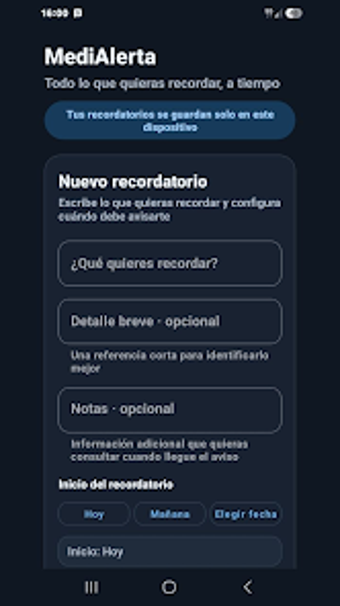
MediAlerta by MediAlerta Team is an Android reminder app for medication routines and everyday tasks. It schedules alarms and notifications with flexible start dates and repeat intervals, offers pre-alarm warnings, and supports snooze, skip, and completion tracking to manage recurring commitments. Create custom reminders with descriptions and optional notes, review a detailed activity history, and customize alert duration and behavior. Appeals to medication managers, students, and anyone seeking a private, offline-capable alternative to cloud-based task apps.
How does MediAlerta deliver reminders reliably when the app is not open?
MediAlerta relies on native Android alarm and notification services so scheduled alerts are handled by the system rather than by a persistent foreground process. The app registers alarms with the platform alarm manager, which triggers notifications independently of the app's active state. That means alerts appear as system notifications even if the app is closed, and the delivery mechanism follows standard Android notification behavior rather than continuous background polling.
Does MediAlerta keep device impact low during idle periods?
The tool is designed as a lightweight, focused utility with no intrusive advertisements or cloud bloat, and its use of system alarm services removes the need for constant network activity. Because alarms are fired by the platform, the app does not have to run continuous background tasks, which reduces ongoing CPU and network activity between reminders. This design is suited to users who prefer minimal battery and processing overhead for scheduled notifications.
Is MediAlerta private and recoverable across devices?
Data stays on the device and the app requires no account registration, reflecting the developer's focus on privacy-centric Android utilities. For migration or archiving, MediAlerta offers manual backup and restoration so users can export their reminders and settings to a chosen file location and restore them later. Users report a straightforward interface and reliable behavior for daily scheduling, which supports routine use without cloud services.
Practical choice for single-device, privacy-focused reminder needs
MediAlerta is a practical option for users who need an offline reminder tool that avoids cloud accounts, because it keeps data local and uses system alarms for delivery. The main trade-off is the absence of automatic multi-device synchronization, so transfers require manual export and restore. For single-device medication schedules or assignment tracking it delivers dependable notifications with a conservative system footprint. Recommended.